How To Reinstall Windows Without Losing Anything Here Is Another Possible Solution:easy way and tested:
1- Start WindowsXP
2- Go to the location of your source files
3- Run WINNT32 /unattend
For example, D:\I386\winnt32 /unattend ( copy & paste this command into the RUN box, then press ENTER ) Your computer will do the rest.
Or,
Start > All Programs > Accessories > Command Prompt.
Copy & paste > D:\I386\winnt32 /unattend
Press Enter.
If you have i386 on your drive, you can replace D: ( if D: is your cd drive ) with the location of it.
I've often need to do this to repair something that had gotten corrupted and didn't want to do a clean install.
D: is the driver letter where your windows XP Cd is
if D:\I386\winnt32 /unattend doesn't work then try : d:\winnt32 /unattend.
Showing posts with label Changing drive letters in Windows XP. Show all posts
Showing posts with label Changing drive letters in Windows XP. Show all posts
Thursday, June 12, 2008

Sunday, April 27, 2008
Changing drive letters in Windows XP.
We all know that whenever you add another hard drive or a CD-DVD drive, Windows automatically assigns a letter to the corresponding drive. If in any case you want to change the letter assigned to any drive, or if the letters assigned are no suited to your system, you can definitely change them.
In order to change the drive’s letter, follow the steps:
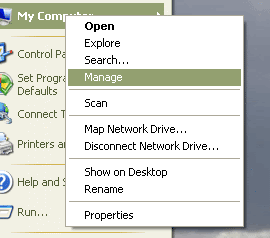
- Right click My Computer and Click Manage.
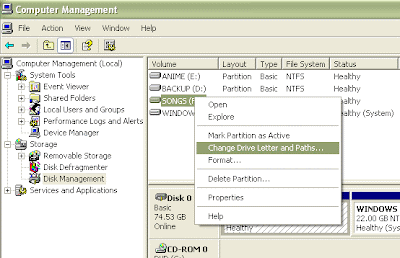
- Under Computer Management, click Disk Management.In the right side, you’ll see all the drives that are currently on your system.
- To change the drive’ letter, right click the drive and then click Change Drive Letter and Paths.
- Click Change, then click Assign the following drive letter, select the letter from the drop menu box, and then click Ok.
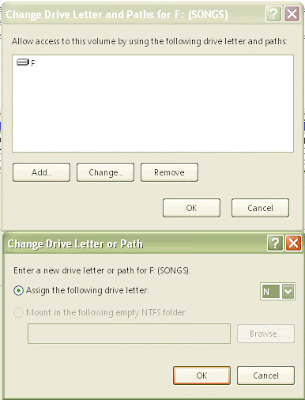
- Windows may warn you about changing the drive’s letter and that some program may not work, click Yes.
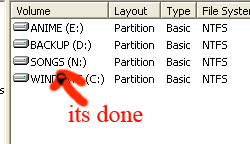
You’ll not be able to change the boot drive letter (usually C).
Note: The shortcuts will need to be updated for the changed drive’s programs. (Ex. F:\a.doc will become N:\a.doc).
Subscribe to:
Posts (Atom)